Promise.all, and the same requests one at a time
The Hacker News API hands you IDs, not stories. Promise.all turns three hundred round trips into one wait — and the 2019 version of this page fetched five hundred at once.
Not every list endpoint returns the things you want. Hacker News is the clearest example I know: /v0/topstories.json returns an array of item IDs and nothing else. To get the top ten posts with their titles, you make one request for the list and then one request per story.
curl https://hacker-news.firebaseio.com/v0/topstories.json[
33256378,
33259379,
33256446,
33257197,
33249215,
33254791,
33251954,
33257300,
33244819,
33228387,
33247681
]Each of those IDs has its own endpoint, and only there do you find the title, the score and the author:
curl https://hacker-news.firebaseio.com/v0/item/33257197.json{
"by": "walterbell",
"descendants": 52,
"id": 33257197,
"score": 110,
"time": 1666149822,
"title": "IDA cybersecurity software provider Hex-Rays acquired",
"type": "story",
"url": "https://smartfinvc.com/news/smartfin-acquires-leading-cybersecurity-software-provider-hex-rays-together-with-sfpim-and-sriw/"
}The shape of the problem
Ten stories is eleven requests. Three hundred stories is three hundred and one. Done one after another, that is three hundred waits, each of them mostly a network being idle; done together, it is one wait with three hundred requests in it. That is all Promise.all is for, and the flow is worth seeing once:
The code is shorter than the diagram. Every request is created first and they are all awaited together:
const getJSON = (url) =>
  fetch(url, { mode: "cors" }).then((response) => response.json());

const topStories = (count) =>
  getJSON("https://hacker-news.firebaseio.com/v0/topstories.json").then((ids) =>
    Promise.all(
      ids
        .slice(0, count)
        .map((id) => getJSON("https://hacker-news.firebaseio.com/v0/item/" + id + ".json"))
    )
  );
The same work, both ways
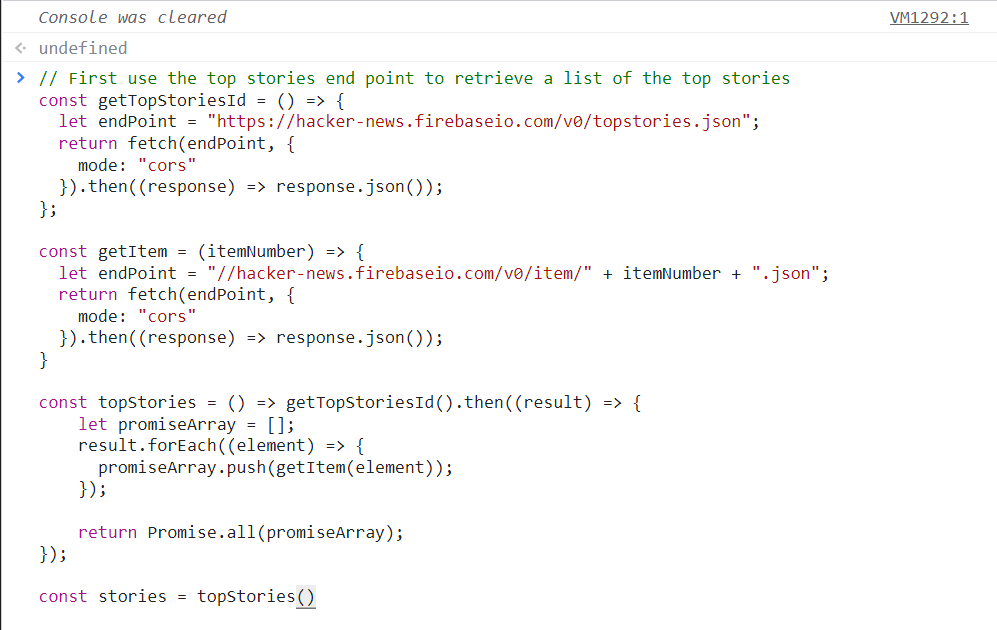
The 2019 version of this page did not run at all — the script was commented out and the reader was told to paste it into a browser console, which is what the screenshots below show. It runs here instead, and it runs the work both ways so the difference is a number on the page rather than a claim.
Loading the demo…
| # | Score | By | Title |
|---|
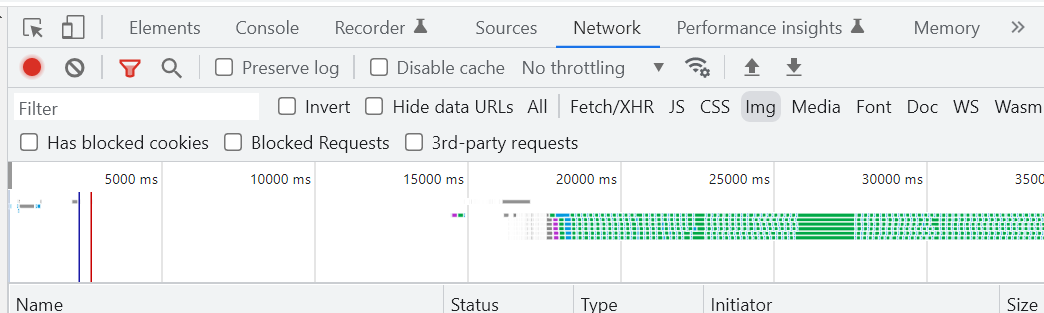
Press both buttons and compare the milliseconds. The 2019 script mapped Promise.all over all five hundred top stories; that is why its network screenshot shows a waterfall running past thirty seconds. Fifty is the ceiling here, and the readout says how many requests it took.
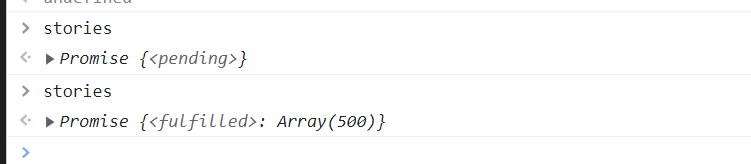
The screenshots, in the order the post used them: the console with the code pasted, the network tab while it runs, and the promise going from pending to fulfilled.
What it taught me
thenreturns a promise too, which is the whole reason the chaining above works: the secondthenwaits on thePromise.all, not on the first fetch.fetchis significantly easier than its jQuery counterparts, with the caveat it always had: it is a modern API, and a static site with no build step is at the mercy of the browsers its readers bring.- CORS is the modern answer and JSONP is the old one.
mode: "cors"is a line in a fetch call; JSONP is a script tag, a callback name and a server that has to cooperate. The APIs worth using now send the header. Promise.allfails as one. One bad request rejects the whole thing, which is what makes the validity check in the diagram matter — there is no partial result to fall back on.Promise.allSettledis the version that keeps the successes, and it is the one to reach for when a single failure should not cost you the other nine.- Batching does not remove the work. Five hundred requests are still five hundred requests; they just stop queueing behind each other.
- An API with no wrapper gets one eventually. Plenty of people wrote one for Hacker News, and the one used on this site's word cloud post is a read-only mirror of it.
References
- Promise.all — MDN
- When to use Promise.all — the 2019 reference.
Bye.
Written in 2019, ported from the old Hugo site and lightly edited. The code, the end points and the three figures are the originals, and the flowchart was a mermaid block there and is now an SVG in the site's figure grammar. The demo now runs: it never ran on the old page.
Comments
Discussion lives on GitHub — you'll need a GitHub account to post.