Getting a subreddit's data with Python
The .json trick, a Python crawler, and the async version that pulls whole comment threads — plus the part of it that stopped working.
As of March 2022, Reddit ranked as the ninth-most-visited site in the world. What makes it useful rather than just popular is the structure: subreddits for every interest, and every thread a comment tree you can walk. Here is how I pulled data out of it, and — further down — the part of this that no longer works.
The basic method
The easiest way in was to ask for the page you were already looking at with .json on the end. https://www.reddit.com/r/programming returns HTML; https://www.reddit.com/r/programming.json returns the same thing as JSON. No API key, no setup, no OAuth dance — with the obvious caveat that there is nothing stopping Reddit rate-limiting you.
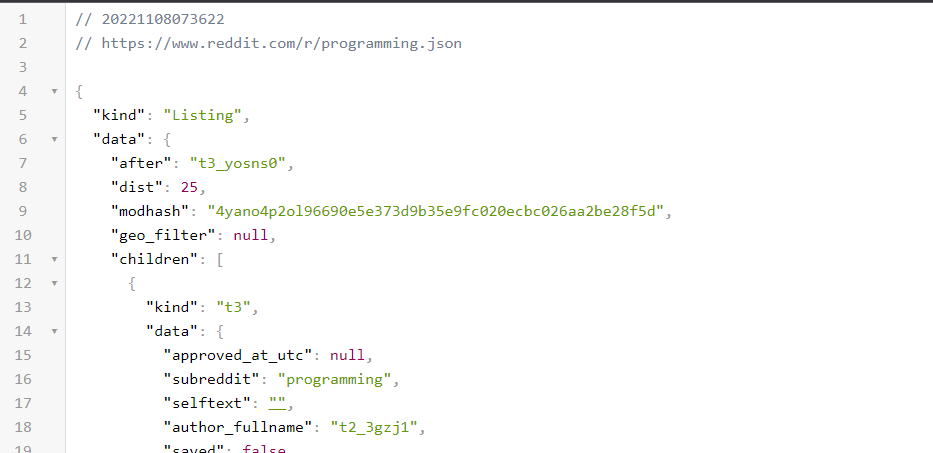
Listing with a children array, and each child a t3 — a post — with its own data.With that in hand, the crawler is short. The only subtlety is the header: a made-up browser User-Agent, because the plain requests default was refused.
import json
import requests

REDDIT_URL: str = "https://www.reddit.com/r/programming.json?limit=100"

def process():

    # Create header to spoof browser
    header = {
        "Connection": "keep-alive",
        "Upgrade-Insecure-Requests": "1",
        "User-Agent": "Mozilla/5.0 (Windows NT 10.0; Win64; x64) AppleWebKit/537.36 (KHTML, like Gecko) Chrome/83.0.4103.97 Safari/537.36",
        "Accept": "text/html,application/xhtml+xml,application/xml;q=0.9,image/webp,image/apng,*/*;q=0.8,application/signed-exchange;v=b3;q=0.9",
        "Sec-Fetch-Site": "same-origin",
        "Sec-Fetch-Mode": "navigate",
        "Sec-Fetch-User": "?1",
        "Sec-Fetch-Dest": "document",
        "Referer": "https://www.google.com/",
        "Accept-Encoding": "gzip, deflate, br",
        "Accept-Language": "en-US,en;q=0.9"
    }

    r = requests.Session()
    r.headers = header
    try:
        response = r.get(REDDIT_URL)
    except:
        exit(1)

    # Get the results of the request - posts is a array of JSON.
    # Notice here we are accessing the data -> children
    posts = response.json()['data']['children']
    results = []

    # We will use this urls later to get the comments.
    urls = []

    index = 1
    for post in posts:
        print(str(index) + " out of " + str(len(posts)))
        index = index + 1
        title = post['data']['title']
        permalink = post['data']['permalink']
        name = post['data']['name']
        created = post['data']['created_utc']
        selftext = post['data']['selftext']

        result = {
          "title": title,
          "permalink": permalink,
          "name": name,
          "created": created,
          "selftext": selftext
        }

        urls.append("https://www.reddit.com" + permalink + ".json")

        results.append(result)

    print(json.dumps(results, indent=4))

if __name__ == "__main__":
    process()
    exit(0)
Limited to a single post, the output is small enough to read:
[
    {
        "title": "NVIDIA Security Team: \"What if we just stopped using C?\" (This is not about Rust)",
        "permalink": "/r/programming/comments/yoisjn/nvidia_security_team_what_if_we_just_stopped/",
        "name": "t3_yoisjn",
        "created": 1667817127.0,
        "selftext": ""
    }
]
The permalink is the useful field: it is the address of the thread, and appending .json to it gives the comments. Collect those and you have a work list.
The same thing, asynchronously
A few hundred threads is a few hundred round trips, so the second version fetches them concurrently rather than one at a time.
    with FuturesSession(max_workers=30) as session:
        session.headers = header
        futures = [session.get(url) for url in urls]
        for future in as_completed(futures):
            replies_response = future.result()
            temp = replies_response.json()[0]["data"]["children"][0]["data"]["title"]
            print(temp)
            _replies_arr = replies_response.json()[1]
            replies = []
            for reply in _replies_arr['data']['children']:
                _body = reply['data']['body']
                replies.append(_body)

            submission = {
                "title": temp,
                "reply": replies
            }
            submissions.append(submission)

    print(json.dumps(submissions, indent=4))
Two things about that snippet as published: it relies on from requests_futures.sessions import FuturesSession and from concurrent.futures import as_completed without showing them, and the reply text arrives HTML-escaped, so > and < come through as entities rather than as the quote marks they were.
The output is a post with its replies attached. Four of the twenty-one that thread returned:
[
    {
        "title": "NVIDIA Security Team: \"What if we just stopped using C?\" (This is not about Rust)",
        "reply": [
            "That's pretty cool.\n\nThough I find it fascinating they didn't go for the low-hanging fruit of the way they do UI<->driver interactions and how many layers of vulnerabilities come from that, nevermind how \"heavyweight\" it all is.\n\nBut as far as the backend goes, that's a damn cool change, especially that it was accepted so well.",
            "> What if we just stopped using C?\n\n> #504 Gateway Time-out\n\nis this some elaborate shitpost that is flying over my head?",
            "I think reddit hugged it to death.",
            "tf is spark"
        ]
    }
]
The part that stopped working
This is the important paragraph, and it was not in the original post.
Reddit's unauthenticated .json endpoints no longer answer reliably. Nothing above works as written: https://www.reddit.com/r/programming.json returns 403 Blocked — an HTML block page — to a client without a session, and it sends no CORS header at all, so fetch() from another origin is out too. That is why three demos elsewhere on this site — the percentage charts, the r/programming word cloud and the AFINN scorer — ask the endpoint anyway, through the JSONP <script> their 2019 versions used, and fall back to text you paste when Reddit refuses.
What replaced it is the official API with OAuth: register an app, get a client id and secret, and a token buys you 100 queries a minute on the free tier. The shape of the crawler does not change — request, walk data.children, follow permalinks, collect — but every request now carries a token, and the token has to be refreshed on a schedule. The spoofed-User-Agent trick is dead; the honest version of this post is "get a client id".
For scripted crawls it is worth deciding early whether what you want is the listing or the threads, because the threads are where the request count goes — and where the rate limit bites.
Where the data went
This crawl is the beginning of the AITA store: a Reddit crawler, a SQLite store, and a dashboard over r/AmItheAsshole, which ended up with twelve stars and a FastAPI rewrite. The gist for this post's code is here.
If you are keeping the data, do it properly: insert into a database, key on the post's name so you can deduplicate, and update rather than append. This method is enough for a one-off, and not enough for anything you intend to run twice.
Bye.
Written in 2022, ported from the old Hugo site and lightly edited. The Python and the example output are unchanged, except that the comment dump is trimmed to four replies of twenty-one and the missing imports are now mentioned rather than silently fixed. The paragraph on OAuth was added: the endpoints this post teaches have since stopped answering.
Comments
Discussion lives on GitHub — you'll need a GitHub account to post.